Sunday, March 30, 2008

Word of Advice for Photoshop Beginners

Yesterday I met with a girl that modeled for me many years ago when I was just getting started with professional photography. She recently got engaged and wants to hire me to do a photo shoot for her and her fiance so they have nice photos to send with their engagement announcements. During our meeting I showed her my updated portfolio and we talked a bit about the various compositions I could do for her using Adobe Photoshop CS3. She made a comment about how much of a difference she could see from the photo shoot we had done together many years ago and some of my most recent work. Other than being a nice boost to my ego it made me think about how much I knew about photography and Photoshop back then and how much I know now. After the meeting I went back and looked at the compositions and editing I have done over the years and it made me realize how much time I wasted as a beginner. Many of the things I had done in the past that took me countless hours only takes me a few minutes now. While some of this is just familiarity with the software, much of it has to do with learning techniques.

So, about that word of advice to those Photoshop beginners out there... Do yourself and your clients a big favor and spend some time learning how to use layers. I do not mean just using them... I mean how to **REALLY USE** them! There is a lot to learn about Photoshop's implementation of layers and they are an extremely powerful tool. Most importantly, learn how to use layers, layer masks, and blend modes. If you couple these items with any of the other features in Photoshop, you will save you so much time and produce much higher quality work that ever before.

Now that I have convinced you to look more into layers and techniques, I will give you some resources to help.

1. Matt Kloskowski recently published a new book that is dedicated to layers; Layers: The Complete Guide to Photoshops Most Powerful Feature. It is simply amazing and a must read for anyone that wants to know how to use Photoshop well. I consider myself to be a fairly advanced Photoshop user (I put Kelby, Kloskowski, Cross, Versache, Vanelli, etc.) in the 'Photoshop Gods' category so I can call myself advanced) and I learned a lot of new tricks from this book. Speaking of Scott Kelby, his books on Photoshop and photography are well worth having.

2. Subscribe to iTunes podcasts dealing with Photoshop Tips & Tricks. I recommend the following free podcasts (search the iTunes podcast list):
3. Bookmark and read professional instructors blogs and article sites. You can use Google to find a lot of them but I will list a few of the ones I read. Many of them you can get sent to your email whenever they are updated which makes it easy to get the knowledge without having to remember to check the site often.
4. Attend training events! There are a lot of professionals who travel to various cities and give seminars on various photography and Photoshop topics. The biggest one is Photoshop World which just so happens to be later this week in Orlando, Florida.

5. Practice, Practice, Practice. I know it is a cliche but had to be said. You can watch all the podcasts in the world but without actually taking photos and playing with them in Photoshop you are not going to develop the skill to do well at it.
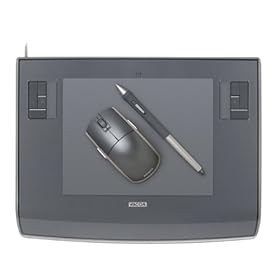
Last but not least, I highly suggest that you get a Wacom Intuos3 tablet. My first tablet was a Wacom Graphire3 of the type they no longer make. It worked great but once I started using Photoshop the way it was meant to be used, I had to upgrade. The Intuos3 opens up a lot of cool features that are easy to use; pen tilt and pressure sensitivity to name a few. While the use of a tablet deserves a separate post of its own (which I may do in the near future), I had to mention it here. It really does give you a huge advantage over photographers and graphic designers who don't use one. Of course, if you have the money to get the even higher grade Wacom tablets, go for it. Send me one while your at it!

Friday, March 28, 2008

Declaration of Purpose

Looking back over the years I can count the number of blogs I have created on one hand. I can also count the number of posts in each of them on one hand. The only exception is a LiveJournal account that I have, surprisingly enough, maintained quite well for the last few months. However, my latest idea for a blog doesn't seem to fit the LJ environment very well so I went in search of something better. I was going to create a Word Press blog site of my own but decided that the amount of money and work involved in designing it to my liking was not to my liking. So... a new blogger.com user I became.

The idea that I had for a blog came out of a belief that many engineers, myself included, have had for many years; that Apple computers are no good for engineering. I admit that I was part of the crowd that dismissed the idea of buying a Mac without a second thought simply because I believed that they were only good for two things; photo and video editing. I must also admit that, while this belief may have been correct many years ago, it is NOT correct anymore. So the idea was to create a blog to discuss my use of the Mac to perform various engineering tasks (mainly software development) that are still based on a work environment of Windows and Linux.

I started to research the capabilities of the Mac and OSX Leopard a few months ago after finally giving up on Microsoft Vista. I bought a HP "Vista Ready" laptop just over a year ago when my Dell Windows XP SP2 machine developed multiple vertical lines on the screen. I am not sure if it was because Vista looked really cool or if I was just happy to have a new computer but I really liked Vista at first. It took a little getting used to but I started telling people how cool it was soon after buying it. But then I started installing programs on it and watched the performance of the machine crash. It started running so slow that I had to turn Aero (the fancy 3D-ish UI) off just so I could use the thing. And yes, I know how to maintain a computer so don't bother using the "your too stupid to own a computer" excuse to argue that Vista is so great.

What I found in my research convinced me to make the switch from Microsoft Windows XP & Vista over to OS X Leopard. I recently purchased a new Intel chip based MBP (MacBook Pro) and have been using it for about two weeks now. When I first decided to switch I promised myself that I would go into this with an open mind so I wouldn't get caught like I did with Vista. I must say that it has been getting harder and harder to keep an open mind since getting my MBP. It has been nothing but a joy to use and I have been able to do everything I could on Vista plus more.

So the general idea for the blog was to discuss various engineering topics and how I handle them using the Mac in order to show other engineers that the Mac platform is a good alternative to the nightmare that is Microsoft Vista. However, I have decided to expand the idea slightly to include various topics relating to my photography as well. I will categorize every post using labels so readers can easily filter out the stuff they don't really care to read.

Let the fun begin.